
Workflow for creating a shipment
Overview of how to create a shipment.
Creating a shipment via multi step process
Creating a shipment is a multi-step process that includes calls to the Shipping API. Here is the recommended workflow for creating a shipment:
-
Call the
getRatesoperation to get a set of eligible rates for the shipment. -
(Conditional) Call the
getAdditionalInputsoperation if directed to do so by thegetRatesoperation to discover additional data required to purchase a shipment. This step is required for international shipments. -
Call the
purchaseShipmentoperation with any required additional inputs to create a shipment.
Here is a diagram of the recommended workflow for creating a shipment:

Creating a shipment via single step process
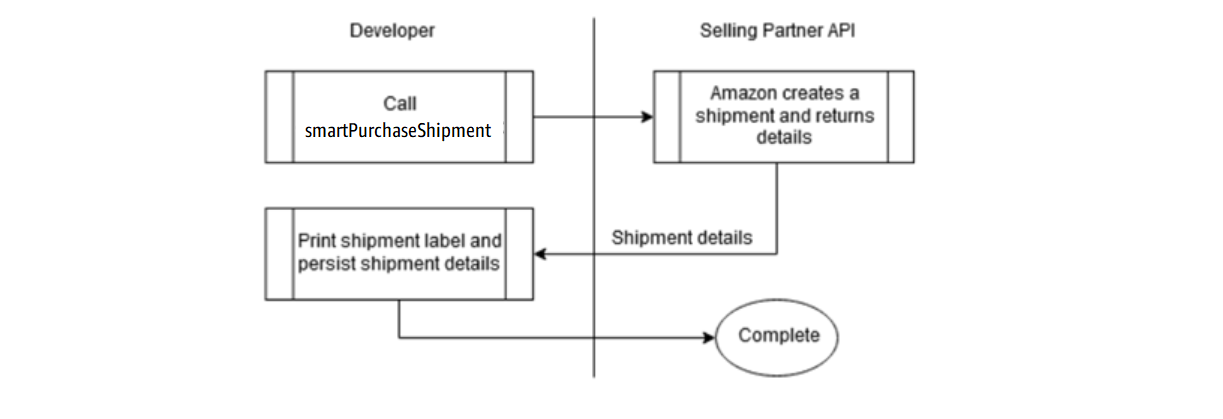
Alternatively, vendors can purchase the best fit ship option for the package by calling the smart purchase shipment API via the oneClickShipment operation.
- Call the
smartPurchaseShipmentoperation to create a shipment. Once a shipment is created, the Shipping API provides operations to manage a shipment.
Here is the recommended workflow for creating a vendor own carrier Direct Fulfillment shipment:
Note: When providing package dimensions, note that Amazon Shipping API normalizes dimensions so that length ≥ width ≥ height, per the Service Guide definition. You do not need to presort dimensions, the largest dimension value is assigned to length, the middle to width, and the smallest to height while preserving the units.
Other important APIs
-
Call the
getTrackingoperation to get the current status and tracking history for a purchased shipment. -
Call the
getShipmentDocumentsoperation to return documents associated with a package in the shipment. -
Call the
cancelShipmentoperation to cancel a purchased shipment.
Here is the recommended workflow for managing a shipment. These operations are not available for Direct Fulfillment shipments.

Updated 2 days ago